Mellel 6.8 introduces Cloud Sync, editing enhancements, and a refined appearance.
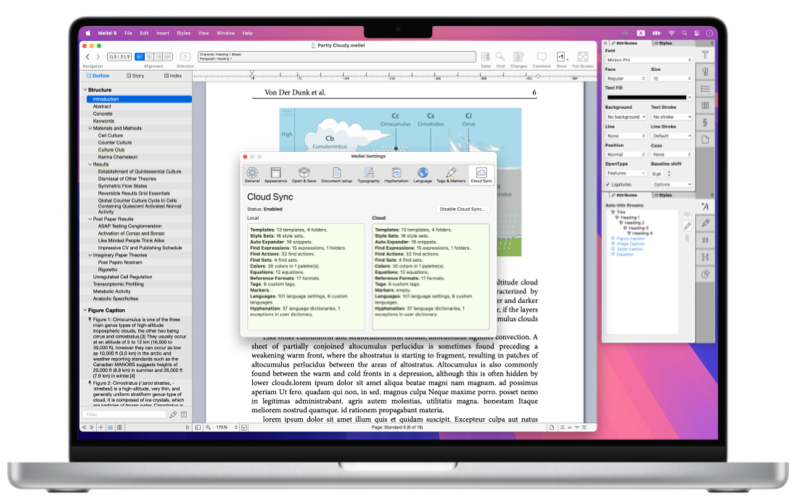
Release Notes for Mellel 6.8 (Build 68037, October 17th, 2026)
- Cloud Sync - Synchronize Mellel resources and settings across your computers with iCloud. Settings and resources include:
- Document templates.
- Style sets.
- Auto Expander snippets.
- Find expressions.
- Find actions.
- Find Sets.
- Color Tables.
- Equations.
- Reference formats.
- Tags.
- Markers.
- Text languages.
- Hyphenation dictionaries.
- Return/Enter Reform
- Pressing return when an inline image or equation are selected will place the insertion point after the image/equation in the text. This allows keyboard only flow of inserting an equation and continuing work without needing to use the mouse.
- Pressing enter (not return) with an image or table object selection will open the editing popover.
- Pressing return when an image or table is selected as text, will convert selection to an object (with handles) selection.
- Pressing return with a table object selection will move into the first cell of the table for editing.
- Outline
- Added Delete Item to the context menu.
- Added Markers submenu to the context menu.
- Improved selection behavior. Section header selection is not allowed.
- Index
- Added ellipsis button to record display providing access to the menu (previously accessible only via context menu).
- Added Quick Index For Record option in index record menu. This options shows the Quick Index panel, sets the record name as the search string and selects the record as the current record.
- Other Goodies
- Auto-Expander - added support for multi-paragraph snippets.
- Added Reset License option for clearing the license and signing in again. This option is invoked by holding the option key during the launch of the app.
- Appearance Tweaks
- Refined side pane (Outline, Story, Index) header tabs appearance.
- Refined colors for the ruler, track changes, and find panes.
- Replace Styles sheet is now resizable.
- Find Set window - Refined colors, added label to the log area.
- Auto Expander window - Refined colors.
- Bug Fixes
- Fixed layout issues with the Edit Section Style dialog.
- Fixed layout issues with the Edit Note Style dialog.
- Hyphenation dictionaries list in Mellel Settings is now sorted.
- Made some tweaks to the layout of several palettes to avoid issue in some localizations.
- Fixed an issue that caused failure to perform a single replace (as opposed to replace all) in an annotation.
Compatible With macOS 10.13 (High Sierra) or later.